New Watch the 2-minute tour

Edit anything.
From 3D to 2D.

toEdit is the video editor with an AI agent inside: one timeline for 2D and 3D, motion without keyframes, a transcript you cut by reading, and function parameters made for AI agents — Claude, Codex or Gemini edit with you.

770components
16style packs
2D · 3Done timeline
100%on your machine
AI agentplans, builds, checks its frames
Editortranscript cut · captions
Motiona path you grab, no keyframes
3D Stagecamera, worlds, physics
On your MacTTS · retouch · tracking

Everything you touch
moves the way you mean.

Built by an editor who got tired of jumping between four apps to finish one short video.

01 · AI agent

Say what the video is about. The agent plans it.

Pick a style and describe your video. The agent writes the plan — the hook, the scenes, the storyboard. Say yes and it builds scene by scene with toEdit's own tools, checking its own frames as it goes. Every step stays editable.

  • AI Finish › Build
  • Storyboard
  • Scene by scene
  • Self-review
▶ 0:10 in the tour
02 · Any agent

Claude, Codex or Gemini at the wheel

Drive toEdit from the chat panel, the MCP server or the command line. Every parameter has an address, and functions let the agent wire parameters together — so it can create as freely as you do.

  • Chat panel
  • MCP server
  • Command line
  • Parameter addresses
  • Functions
▶ 0:22 in the tour
03 · Transcript

Cut by reading

The transcript started as a way to cut. Now it is also how the agent understands your footage. Cut every silence and filler word in one pass, match a script, find duplicate takes.

  • Silence
  • Filler words
  • Script Match
  • Duplicates
▶ 0:35 in the tour
04 · Motion

Motion without keyframes

Pick a move from the motion library and it shows on the canvas as a path you can grab and reshape. Keyframes are still there, a lane per layer, when you want to go further.

  • Motion 2D
  • Motion 3D
  • Journey
  • Reaction
  • Editable path
▶ 1:04 in the tour
05 · 3D Stage

Click to focus. Add keys. Fly.

Step into the 3D Stage: click any object to focus the camera on it, set as many camera keys as you like, and the camera flies a smooth path through them. Switch back and you are in a familiar 2D frame.

  • Focus on click
  • Camera keys
  • Smooth path
  • 2D ↔ 3D
▶ 1:17 in the tour
06 · Physics

Characters that react on their own

Cast characters from the 3D character library. Physics is built in, so characters and objects interact with the world by themselves: less code to write, less agent quota spent on hard math, and fewer mistakes — even with small models.

  • Character library
  • Built-in physics
  • Less code
  • Small models welcome
▶ 1:41 in the tour
07 · Object Studio

Open any design and change every layer

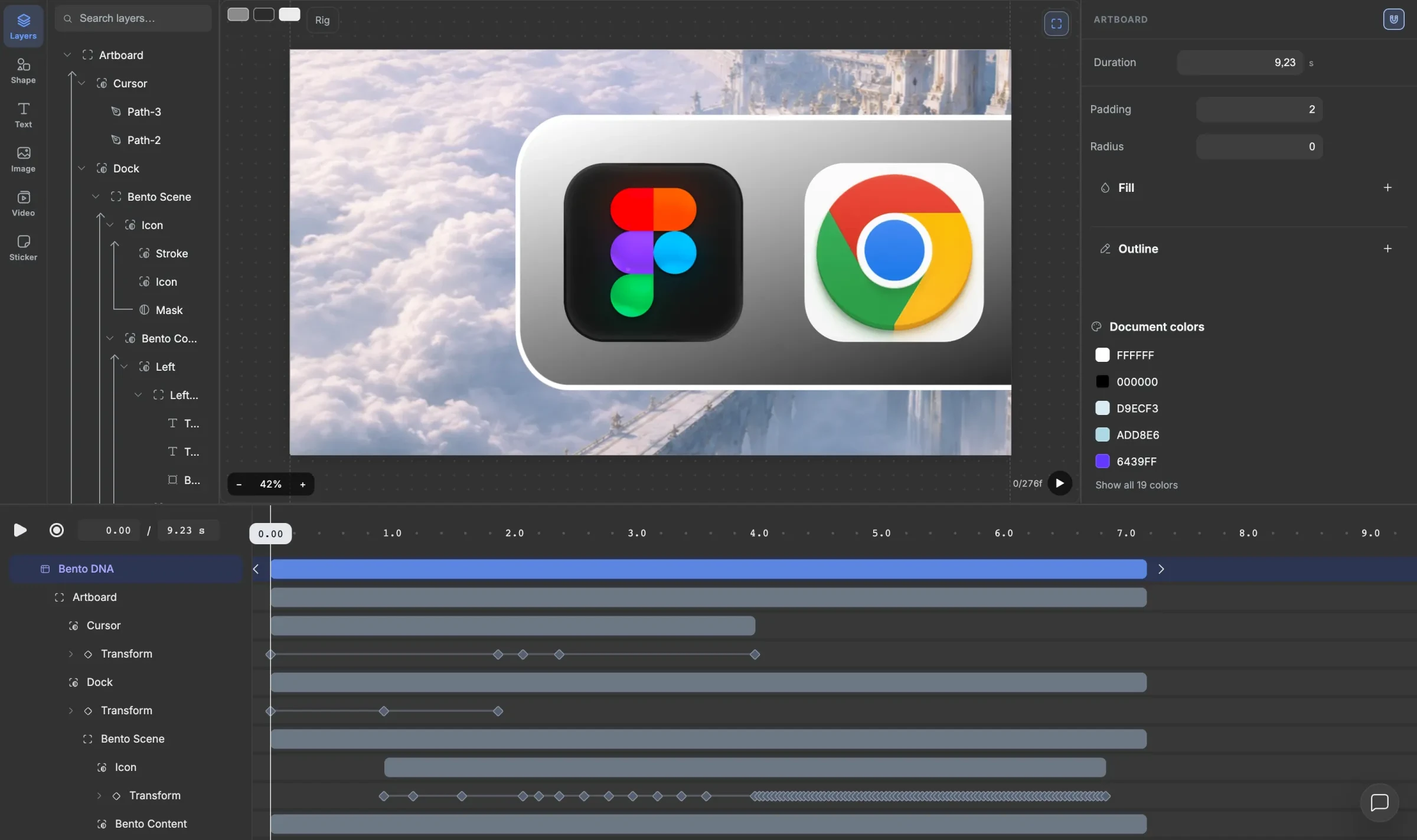
Every component opens in Object Studio: swap the text, drop in your photo, change the colors, rework the animation. Save the result as your own preset and reuse it everywhere.

  • Layers & masks
  • Document colors
  • User presets
Object Studio: layers, artboard and keyframe timeline
▶ 0:45
Captions

Translate and mix caption styles

Translate your captions and mix several caption templates in one video.

▶ 0:51
Templates

Ready-made product templates

Pick one and the agent picks up the style, so it works faster.

▶ 0:57
Transitions & effects

One drop

Transitions that move like a real camera. Creative effects and animation presets go on with one drop.

▶ 1:29
3D worlds

Sky, fog, shadows, maps

Build worlds with sky, fog and real shadows, and fly across real maps.

▶ 1:51
On your Mac

AI tools, no upload

Text to speech, face retouch, background removal and tracking all run right on your Mac.

▶ 1:57
Export

4K, or hand the cut on

Export MP4 in up to 4K, or send your cut to Premiere, Final Cut or CapCut.
16 style packs.
770 components.

Titles, rankings, charts, galleries, CTAs and intros — designed in sets, so a whole video keeps one look. These are rendered straight out of toEdit — open any of them in Object Studio and change every layer.

For AI agents

Function parameters
made for agents.

toEdit speaks MCP. Claude, Codex or Gemini — from the chat panel, the MCP server or the command line — edit with the same operations a person uses — one operation is one undo step, validate runs before anything is applied, and review renders frames so the agent checks its own work. You stay in the timeline and can take over at any moment.

describe

What the editor can do, with every parameter.

resolve_intent

Words → one catalog entry with its parameters.

validate

Try operations on a copy; nothing is applied.

apply

One edit, one undo step, with a receipt.

review

Render frames and layout findings to check.

export

Render with the Editor's own export presets.

// toedit-mcp · apply() // slide the title in, then let it float { op: "keyframe", id: "title", property: "x", keys: [ { frame: 0, value: 0, easing: "linear" }, { frame: 100, value: 1000 } ] } { op: "function", id: "title", property: "x", kind: "oscillator", params: { amplitude: 80, frequency: 1, waveform: "sine" } } // → { receipt, diagnostics, historyDepth }

wave · wiggle · spring · bounce · jitter-hold — on any property, with one parameter.

Who it is for

Editors

Cut faster, finish in one app

Timeline, transcript cut, motion graphics and 3D in one place. Ready-made designs when the deadline is close, full keyframe control when it matters.

Everyone else

Make it look edited

Pick a style pack, drop in your clips, let AI Finish draft the video. Change anything by clicking it — no motion-design background needed.

Agents & builders

Let an agent drive

Connect your agent over MCP and give it a brief. It plans, applies, reviews and exports — every step visible and reversible in the timeline.

Pricing

Plans are being finalised. Leave your email through the trial button and you will hear first.

TrialFree
  • The full editor
  • Style packs included
  • Watermark on export (slot)
Request trial
Pro$ —
  • Everything in Trial
  • No watermark
  • AI Finish › Build
  • MCP for agents
Get notified
Studio$ —
  • For teams and agencies
  • Shared presets
  • Priority support
Talk to us

Questions

Does my footage leave my computer?

No. toEdit is local-first: import, transcription (whisper.cpp), text to speech, face retouch, background removal, tracking, effects, 3D and export all run on your machine. There is no upload step and no per-render fee.

Which platforms does it run on?

toEdit is a desktop app. Platform list and system requirements — slot, to be confirmed before launch.

Do I need to know motion design?

No. Start from a style pack or a motion preset; every preset opens into normal layers and keyframes when you want more control.

Which AI agents can use it?

Claude, Codex and Gemini work from the built-in chat panel, and any agent that speaks MCP can connect, or drive toEdit from the command line. The agent gets the same operations as the app, with validation before changes and frame review after.

Can I make my own components?

Yes. Build one in Object Studio, or open an existing component, change it and save it as your own preset.

toEdit

Stop jumping between apps.
Just edit.